
Have you ever faced the challenge to create a fast and lightweight web service out of your machine learning model? In this case you are maybe annoyed by the overhead introduced by all the machine learning dependencies from the training environment that you also need to carry over to the production environment. This post tests an approach which claims to make it possible to leave most of this behind and share the blank model in a way that it can even be used across multiple programming languages.
ONNX, the “Open Neural Network Exchange” format is an open specification for sharing machine learning models which was released into the open in December 2018 under the liberal MIT license. It is developed by big players of the software industry, amongst them Microsoft, Amazon and Facebook. Also there is growing support by hardware companies like Nvidia or AMD for hardware optimizations. The format covers both deep learning and more traditional model types. It isn’t only about the representation of the models, but there is also an open source runtime attached to it which can do inference in multiple programming languages. The runtime is written in plain C, maybe because there is a C compiler for nearly everything that runs on electricity. And maybe that means that one day also the ONNX runtime can run on everything from a supercomputer to an NFC banking card. For now it already has an impressive record of supported environments. Most remarkably it has support for many of the main programming languages like C++, C#, Java, Python and even partially for Javascript.
ONNX models are typically not created directly. Only recently some support for model training was added to the ONNX runtime. The usual way is to create a model in one of the traditional machine learning frameworks and do a conversion afterwards. There are converters for CoreML, Keras, PyTorch, Scikit-Learn, XGBoost and more. The Scikit-learn documentation explictily mentions ONNX and the alternaive PMML in a section about model serialization.
So the initiative is promising. But can it keep its promises? In the course of this blog post I’ll pick an example to see how ONNX actually performs in practice.
Training an example model
There’s a lot of image processing examples out there. But let us take a look at something simpler and maybe more typical for bread-and-butter machine learning: a text classification. The task is to read a short text and decide which language it is written in. This is solved here with a Tf-idf ngram embedding and a Naive Bayes classifier. Both algorithms are readily available in scikit-learn.
The training data is borrowed from a kaggle competition where the author released it to the public domain. It is a labeled list of short text fragments in 17 different languages. The distribution is of languages is relatively equal. These are some examples of the data:
| Text | Language |
|---|---|
| dans un pays anglophone, vous pouvez totalement l’utiliser. | French |
| झिझक रहा है। यह एक अच्छा सवाल है। मुझे देखने दो। एक पल के लिए मुझे सोचने दो। दुबारा दोहराने के लिए पूछें। क्षमा कीजिय? | Hindi |
| terry sen aslında o meleğe biraz benziyorsun ama ne görüyorum, nasıl o olursun ikiniz çok hoşsunuz | Turkish |
| அது எப்படி நடக்கிறது? | Tamil |
| Кроме того, по мнению Шекмана, проблема в том, что редакторы этих журналов являются не учёными, а издателями и их интересуют прежде всего шумиха, сенсация и фурор. | Russian |
As this is just for demonstration purposes, we dont’t need to focus on data exploration but can continue with creating a model. We start our machine learning task by splitting the data into a train and a test set, so that we can later measure the performance:
data = pd.read_csv(data_folder / "LanguageDetection.csv", sep=",")
x = data["Text"].values
y = data["Language"].values
x_train, x_test, y_train, y_test = train_test_split(x, y, test_size=0.2, random_state=42)
The next step is to create a scikit-learn pipeline for the preprocessing and training. The two steps in the pipeline are a Tf-idf vectorizer on character bigrams and a Naive Bayes model.
from sklearn.pipeline import Pipeline
from sklearn.naive_bayes import MultinomialNB
from sklearn import metrics
from sklearn.feature_extraction.text import CountVectorizer, TfidfVectorizer


clf_pipeline = Pipeline([
    ("tfidf", TfidfVectorizer(token_pattern=r"[\w_]{2,}", lowercase=False)),
    ("naive_bayes", MultinomialNB(alpha=.01)),
])
clf_pipeline.fit(x_train, y_train)
Now that we have a model, we can already test it and measure its prediction quality:
pred = clf_pipeline.predict(x_test)

print(metrics.classification_report(y_test, pred))
| Language | precision | recall | f1-score | support |
|---|---|---|---|---|
| Arabic | 1.00 | 0.98 | 0.99 | 106 |
| Danish | 0.99 | 0.96 | 0.97 | 73 |
| Dutch | 0.99 | 0.98 | 0.99 | 111 |
| English | 0.92 | 1.00 | 0.96 | 291 |
| French | 1.00 | 0.99 | 0.99 | 219 |
| German | 1.00 | 0.98 | 0.99 | 93 |
| Greek | 1.00 | 1.00 | 1.00 | 68 |
| Hindi | 1.00 | 1.00 | 1.00 | 10 |
| Italian | 1.00 | 0.99 | 0.99 | 145 |
| Kannada | 1.00 | 1.00 | 1.00 | 66 |
| Malayalam | 1.00 | 0.98 | 0.99 | 121 |
| Portugeese | 0.99 | 0.97 | 0.98 | 144 |
| Russian | 1.00 | 0.99 | 0.99 | 136 |
| Spanish | 0.99 | 0.97 | 0.98 | 160 |
| Sweedish | 0.99 | 0.98 | 0.99 | 133 |
| Tamil | 1.00 | 0.99 | 0.99 | 87 |
| Turkish | 1.00 | 0.98 | 0.99 | 105 |
| ————– | ————- | ———— | ———— | ———- |
| accuracy | 0.98 | 2068 | ||
| macro avg | 0.99 | 0.98 | 0.99 | 2068 |
| weighted avg | 0.99 | 0.98 | 0.98 | 2068 |
The prediction results are amazingly good. It was low effort to create the model, but nevertheless the overall accuracy score is 98%. So apparently the data is good or the problem simple. In any case it looks as if the solution works reliable enough to be used in production. So let’s see how we can expose the model for inference.
Serializing the model with pickle
The easiest way to pack this model for running in a different environment is to pickle it:
with (output_folder / "classifier.pickle").open("wb") as f:
    pickle.dump(clf_pipeline, f)
This is done often enough, but it has a couple of disadvantages. Two important ones are:
- You can only use the model in Python again.
- Pickle stores type names and values of the object which is pickled including all its attributes. That means to deserialize (“unpickle”) the object again you need to have the original source code and the complete environment which was there when the object was stored. Otherwise, for example if the source code has changed in the meantime pickle might throw an exception like
Attribute error: 'X' object has no attribute 'y'. Or if a dependency is missing you might getImportError: No module named 'X'.
The first one is an inherent problem because pickle is language specific. The second one can be circumvented partially if the objects are stripped down to the most relevant parts before serialization. So fore example one might create a json object with all the relevant parameters and weights of the models and only store this in a file. So it is possible to read the data also in a different context if only the format of the data is known. However, this needs careful attention and therefore won’t be done in many cases.
Converting to ONNX format
Pickling of the sklearn objects has some disadvantages and designing a custom serialization format seems inconvenient. So it would be nice if with ONNX we’d get a standard solution for this problem that can be used without a custom implementation of the (de-)serialization.
To convert Scikit-learn objects to ONNX there’s the package skl2onnx. In case of our pipeline it can be applied as follows:
from skl2onnx import convert_sklearn
from skl2onnx.common.data_types import StringTensorType

# For tf-idf additional settings are necessary
model_settings = {
    TfidfVectorizer: {
        "tokenexp": r"[\pL\pN_]{2,}"
    }
}
# The input of ONNX models is strongly typed. So we need to define that the input is a string
initial_type = [('string_input', StringTensorType([None, 1]))]
# Actual conversion
onx = convert_sklearn(clf_pipeline, initial_types=initial_type, options=model_settings)
So the general process is to define additional options for the model conversion if necessary, then define the inputs and outputs of the model and lastly run the actual conversion function.
There are a couple of things to be discussed here. First, the model would have been converted also without specific settings for Tf-idf. The resulting ONNX model can also be used to do predictions. But unfortunately these predictions are mostly false. The problem is the tokenization. Scikit-learn’s Tf-idf uses the regular expression "(?u)\b\w\w+\b" to define a word. This is a sequence of two or more unicode code points (see sklearn.feature_extraction.text.TfidfVectorizer). In our model we even changed this further and instead provided "[\w_]{2,}" as pattern to use bigrams. The ONNX C++ runtime uses a different regular expression library and per default changes the expression to [a-zA-Z0-9_]+. This is something entirely different, because it means one or more standard roman letters, digits or underscores. For unicode strings this is not very helpful. The resulting tokens are incompatible with the vocabulary build up in tfidf by sklearn during the training. Luckily this behaviour is documented and can be changed by setting the right parameters. So in the code above a parameter “tokenexp” is given to specify an equivalent pattern.
The second remarkable thing is that for the ONNX model the input has to be defined with a name and a type, in this case StringTensorType. As this information is not available per se in the Scikit-learn model it needs to be explicitly provided. In effect the ONNX model carries this information. Especially for multiple inputs this is very helpful, because this reduced the risk of confusing unnamed input features at prediction time.
Once the converted model is ready it can be serialized and stored in a file:
with (output_folder / "classifier.onnx").open("wb") as f:
    f.write(onx.SerializeToString())
Now that the model is available in the standardized format it can be read by other tools or in other programming languages. There even exist tools to directly manipulate the model graph. Another remarkable tool is Netron, a tool for visualization of ONNX models. There exists also a web version of it at https://netron.app. For the model above it renders the following chart:
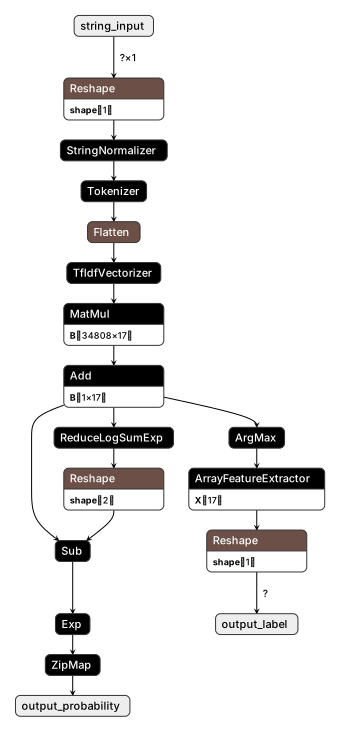
This shows nicely how the algorithm is broken down to a graph of simpler operations.
Deploying for Production Inference
The serialized ONNX model can now be loaded by the ONNX Runtime in the target environment. For demonstration purposes a small web service based on fastapi can be build with the following lines:
from typing import Tuple

from fastapi import FastAPI
import onnxruntime
import numpy as np
import uvicorn


app = FastAPI()


@app.on_event("startup")
async def on_startup():
    """Load the model at service startup"""
    app.state.onnx_session = onnxruntime.InferenceSession(
        "../training/output/classifier.onnx"
    )


def predict_language(string_input: str) -> Tuple[str, float]:
    """Runs a prediction using the onnx model and returns the most likely label and confidence"""
    pred_onx = app.state.onnx_session.run(
        None, {"string_input": np.array([string_input]).reshape(1, 1)}
    )
    label = pred_onx[0][0]
    probas = pred_onx[1][0]
    return label, probas[label]


@app.get("/predict")
async def get_predict(string_input: str):
    """Endpoint definition for the /predict endpoint of the service"""
    language, confidence = predict_language(string_input)
    return {"text": string_input, "language": language, "confidence": confidence}


if __name__ == "__main__":
    uvicorn.run(app, port=8000, workers=1)
The most remarkable thing is how few dependencies are needed. The code only depends on the packages fastapi, uvicorn, numpy and onnxruntime. Of course the situation might change if there is a lot of preprocessing necessary. In this case special libraries might have to be pulled in. On the other hand it is no longer necessary for example to set up heavy framework like Tensorflow for deep learning models.
Comparison of the Scikit-learn and ONNX models
One thing to note is that ONNX per default runs the calculation in multiple threads. This is probably beneficial for larger models, because the calculations can be distributed to multiple cores. For the language classification toy model this mode turned out to be slower than the sequential single-threaded mode. The ONNX documentation contains some hints on performance tuning which discuss the options. It is a good idea to run a few benchmark with different parameters for every new model. For the benchmarks here the model was loaded with the following settings:
    # Set some session parameters for better performance
    sess_options = onnxruntime.SessionOptions()
    sess_options.intra_op_num_threads = 1
    sess_options.execution_mode = onnxruntime.ExecutionMode.ORT_SEQUENTIAL
    sess_options.graph_optimization_level = (
        onnxruntime.GraphOptimizationLevel.ORT_ENABLE_ALL
    )
    # Load the model
   onnx_session = onnxruntime.InferenceSession(
        "../training/output/classifier.onnx", sess_options
    )
That being said let’s do a quick comparison of the two models:
| Criterion | Scikit-learn | ONNX |
|---|---|---|
| Disk size | 11 MB | 3.2 MB |
| Memory needed | 20.2 MB | 1.6 MB |
| Size of virtual environment | 346 MB | 181 MB |
| Inference time (1 item) | 4.74 ms | 1.69 ms |
| Inference time (10 items) | 55.8 ms | 68.3 ms |
The size of the models on disk as well as in memory is much smaller for ONNX models. Also the packages to be installed for an inference API (fastapi, uvicorn and the model dependencies) weigh much more for Scikit-learn. With regards to the inference time we have a split result. For single-items ONNX is faster, for batches Scikit-learn is faster. For larger batches it is even worse. This is likely due to a suboptimal implementation of the runtime, because it has the potential to be faster. The Python implementation is completely written in C and C++ with lightweight Pybind11 bindings. There are some issues on github (partially closed, partially open) which show that also other people with different model observe such a behaviour and that these topics are also being addressed by the community.
Summary and Outlook
ONNX provides a well-usable toolset to serialize and deserialize models. Even when both training and inference are done in Python, ONNX still offers some advantages. Disk space (and therefore network traffic and loading time) can be saved and also the memory footprint of the example model is much smaller. For prediction the ONNX can be faster, but especially for batch predictions it doesn’t have to be the case.
With PMML there exists an older attempt to create a universal serialization format for machine learning models. It is an XML format, but doesn’t seem to have reached the same level of adoption and maturity as ONNX. Another competitor is KNNF. The blog post didn’t cover these alternatives.
Things are getting really innovative if inference is done with the JavaScript runtime “ONNX Runtime Web”. It is not yet feature complete, but has great potential because the workload of the predictions can be offloaded to the user’s web browser. Nevertheless it is also efficiently implemented using Web Assembly. The MNIST demo impressively shows how reactive such an application can be, creating a very convincing user experience.
The source code for the model training and the experiments is fully available on github. If you want to read more might also be interested to browse through the ONNX tutorials repository.
python performance machine learning